企业简介 / About us






17.3-inch 8-Port HDMI KVM Control Platform
1920*1080 17.3" HD KVM ConsoleThe 17.3-inch 8-port HDMI KVM console is a 1U rack-mounted all-in-one control platform equipped with a Full HD LCD screen, enabling the centralized management of eight HDMI-connected hosts using a single set of keyboard, mouse, and monitor, with rapid switching via multiple methods.
1920*1080 17.3" HD KVM Console
KVM-5708HD
- Parameters
KVM-5708HD
| Product Features:
Ø All-in-One 17.3' LED Display/Keyboard/Mouse/Switch Unit
Ø Adjustable LED LCD display with self-locking rails
Ø Sliding installation design allows for length adjustment to fit various cabinet spaces
Ø Automatically records and saves the keyboard’s original working state when switching computers.
Ø Supports a wide range of USB wireless and wired mice and keyboards from various brands
Ø LED indicators or the display screen indicate the currently active host
Ø Multiple switching methods available: KVM OSD menu, buttons, and hotkeys; digital display of port statuses
Ø Auto-scan function enables the KVM to automatically scan computers one by one.
Ø Exceptional video quality, with a maximum resolution of 1920×1080 at 60 Hz (customizable to 3480×2160 at 30 Hz)
Ø Bilingual (Chinese and English) menu;
Ø Redundant power supply design: Supports dual power inputs, wide-voltage auto-adaptation, low power consumption, and stable operation.
Ø Expandability and Compatibility
·Supports cascading expansion; a single 8-port unit can manage up to 64 servers
·Fully supports the DDC2B protocol; can detect display device information even on unswitched channels
·Compatible with mainstream servers and industrial PCs from IBM, Dell, HP, Sun, Lenovo, Advantech, and Yanshang
·Supports multiple operating systems, including Windows, Linux, CentOS, Kylin, and Ningsi
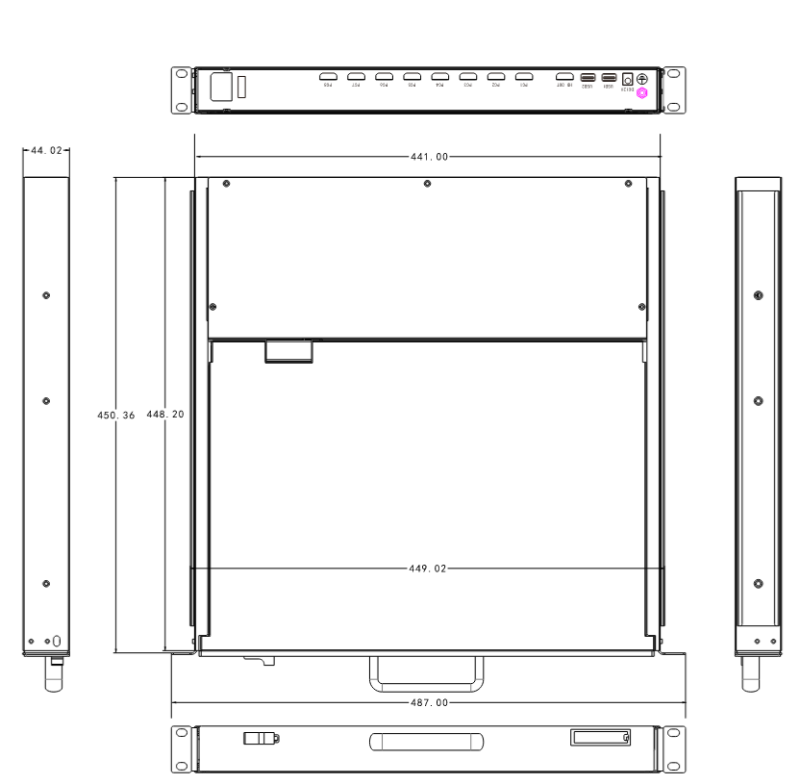
| Three-view drawings of the product:
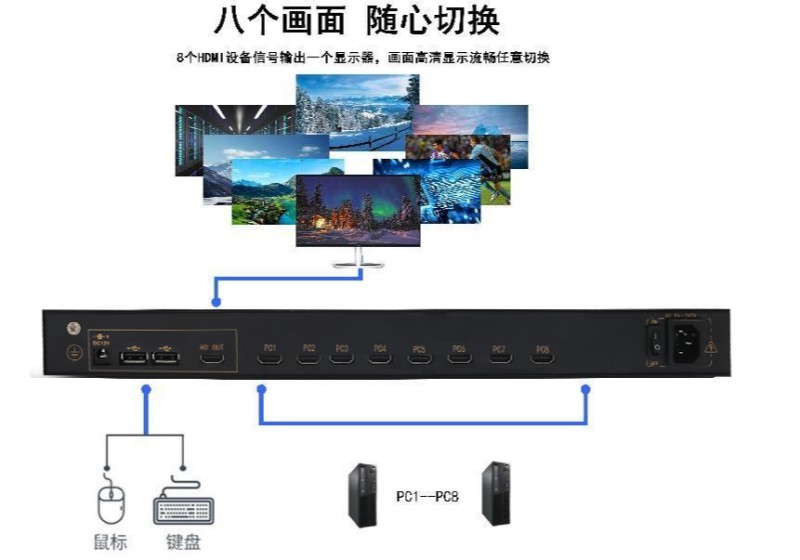
| 产品连接示意图:
| Product Specifications:
model | KVM-5708HD | |
Computer Connection | 8 computers | |
Port connector | USB & HD | |
Control Port Type | USB & HD | |
switching mode | Screen Menu, Hot Keys, Buttons | |
LCD | size | 17.3' TFT LED |
resolution ratio | 1920×1080 at 60 Hz; customizable to 3480×2160 at 30 Hz | |
Maximum Color | 16.7M | |
luminance | 300nits | |
contrast ratio | 700:1 (Typ.) (tm) | |
Show display surface type / Pixel spacing | 380*215 16:9 / 0.198 x 0.198 mm | |
Keyboard/Mouse | Key 104: Ultra-thin silent keyboard with a scroll wheel-enabled trackpad | |
source | Supports dual power sources: AC 100–240 V at 50/60 Hz, or a power adapter (12 V, 3.33 A); a built-in power supply is included by default. | |
Actual power consumption of the entire device | 18W | |
Material Technology | High-strength, corrosion-resistant electrolytic plate | |
Appearance Color | Black high-temperature spray painting spot application process (other options available upon request) | |
Size (L x W x H) | 450mm*465mm*44mm; | |
Guideway pulling stroke | 45MM | |
Total opening height of the unit | 325MM | |
Product Weight | Net weight: 9.70 kg; Gross weight: 14.20 kg | |
Install Cabinet | 600–1040 mm (Standard hanging ear length: 400 mm; 650 mm/750 mm available upon request) | |
service temperature | 0℃~50℃ | |
storage temperature | -20℃~60℃ | |
humidity | 0~95%, Non-Condensing | |
| Product Options:
KVM-5708HD | Host Unit / 8 HDMI+USB Cables / 1.5-meter National Standard Power Cord / Mounting Brackets |
| Installation Steps:
1) Open the package, check the equipment and accessories, and contact the sales representative if anything is missing.
2) Connect each host to the KVM switch one by one; connect one end of the cable to the host and the other end to the host port on the KVM switch.
3) Plug the mouse and keyboard into the mouse and keyboard ports on the KVM control unit.
4) Connect the monitor or TV to the HDMI video port on the KVM console (please minimize the use of adapters, or consult the supplier in advance; you may test for compatibility beforehand to reduce unnecessary after-sales support).
5) Power on each host in sequence. After one host has fully booted up (and the mouse and keyboard are functioning normally), power on the next host, and continue until all hosts have fully booted up.


 Copy product links
 Long by picture save/share
INQUIRY


Add Successfully
INQUIRY
Add Successfully

Service Hotline: 400 - 6360 - 586
Company Tel: 0769-22188826
Business Contact: Manager Hu
Phone / whatsapp:+86 19830660173
Email:hujingting861@gmail.com
Company Address: Room 1502, Chengxin Building W2, West Zone, Tian'an Shenchuang Valley, No. 178 Fenggang Section, Dongshen Road, Fenggang Town, Dongguan City, Guangdong Province
Copyright @ VillaGrandis All Rights Reserved某某某有限公司版权所有
Service Hotline: 400 - 6360 - 586
Company Tel: 0769-22188826
Business Contact: Manager Hu
Phone / whatsapp:+86 19830660173
Email:hujingting861@gmail.com
Company Address: Room 1502, Chengxin Building W2, West Zone, Tian'an Shenchuang Valley, No. 178 Fenggang Section, Dongshen Road, Fenggang Town, Dongguan City, Guangdong Province
ICP备案号180006020号-3
 Consultation
